Setting Up Your Development Environment And HTML Basics

Welcome to the first post of the bootcamp. Today we’ll be going over setting up your development environment (dev env) and an introduction to HTML. Your dev env is the programs and tools used to run and compile code locally on your laptop. Here’s where you can download repositories from github (More on github later). This is where we’ll be spending most of our time as we code so let’s get the right industry ready tools up and running.
We’ll need to install a couple different tools: (click to download) not affiliated in any way.
Introduction to HTML
Let’s take a step back to understand what part HTML plays into our bootcamp. HTML is a markup language. What does that mean? It’s literally a language that is used to mark up the structure of websites so that your web browser understands what and how to display on the screen. To write HTML elements, we pick them from a set of standard elements that all browsers recognize. Let’s begin by creating our very own HTML document.
Open Visual Studio Code →
Create a new file by going to file → new file
Save the document as a file called my-webpage.html (Very important that you save your file as a .html file). That’s how the browser knows to render this as a HTML page.
Let’s start with explaining the anatomy of an HTML element. Each element has an opening and closing tag with some content in between.
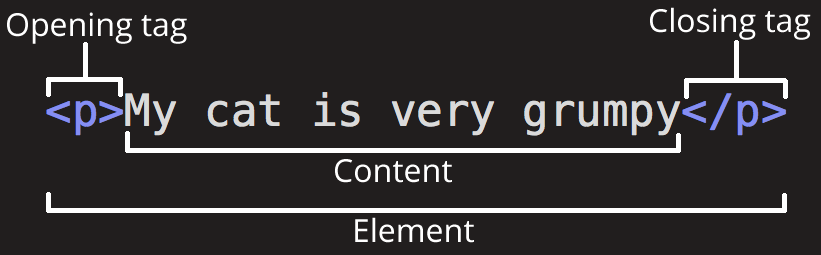
Elements can also have attributes that look like this:

attributes contain information that could be changed the tag itself. (More on this later) .
Now for some basics:
<!DOCTYPE html>
<html lang="en">
<head>
    <meta charset="utf-8">
    <meta name="viewport" content="width=device-width, initial-scale=1.0">
    <title>This is the title.</title>
</head>
<body>
    <h1>heading</h1>
</body>
</html>
Copy and paste this into your file.
DOCTYPE
All HTML documents start with this declaration. It tells the browser what version of HTML the document is written in. You never know when a browser may cause bugs so it’s important to declare this up at the top.
<html> , <head>, <title>, <body>
Every HTML code must be enclosed between the <html> </html> tags.
<head> tag is next which contains all the header information such as the metadata, title, language. (More on metadata later)
<title> tag is what is displayed as text on a tab in chrome.